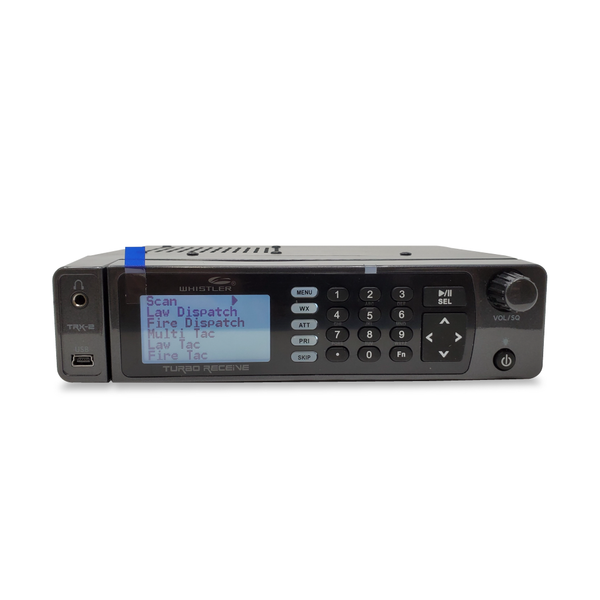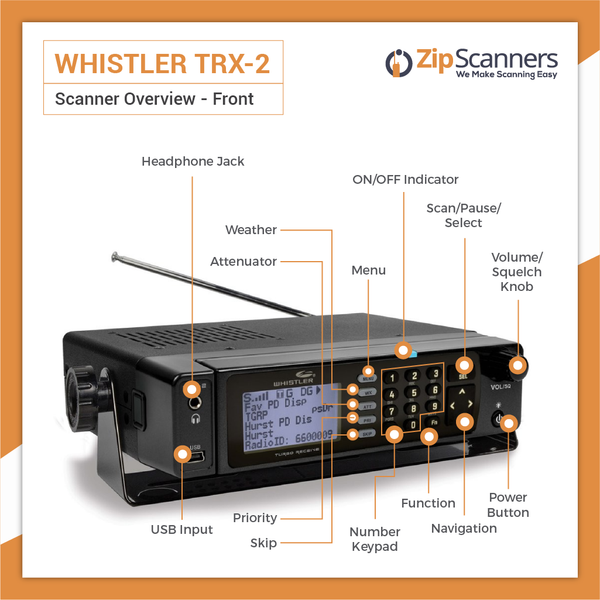


TRX-1 Whistler Police Scanner
Whistler's top handheld digital scanner, with P25, DMR & NXDN support without paid software upgrades.
Upgrade: For better simulcast reception, see the SDS150.
Overview & Features
Want a digital scanner with more features included from day one?
The Whistler TRX-1 digital police scanner delivers a lot of radio capability without making you pay extra to unlock every digital format.
Compatible P25 Phase I and II, DMR and NXDN reception are included, with no separate digital format upgrade keys required. Add a protective case, four replaceable AA batteries and Whistler's flexible EZ Scan programming system, and you've got a pretty capable handheld.
There's one important caveat: we don't recommend the TRX-1 as the first choice for difficult simulcast systems. We'll help you check that before buying.
Why choose the TRX-1?
- P25, DMR and NXDN included. Monitor compatible systems without buying separate digital upgrade keys.
- Flexible Scanlists. Group agencies, frequencies and talkgroups into listening lists you can switch on and off, whether it's county police, local fire or railroads.
- Four replaceable AA batteries. Carry a spare set and swap them as needed rather than depending on a proprietary battery pack. Batteries are sold separately.
- A protective case in the box. The case has removable green and gray inserts and protects the scanner in everyday use.
- Spectrum Sweeper. Find strong nearby radio activity even without knowing the frequency first.
- Recording and playback. Save audio to the microSD card and replay it when needed.
- Custom alerts. Program LED colors and audible notifications for different kinds of radio traffic.
- Free EZ Scan software. Configure Scanlists, manage programming and update the scanner's database and available firmware from Windows.
See the TRX-1 before you buy
Important: TRX-1 and simulcast reception
The TRX-1 handles many digital radio systems, but a complicated simulcast network can produce choppy audio, missed transmissions or silence even when the signal-strength meter looks healthy.
The Uniden SDS100 and SDS150 use specialized True I/Q receiver technology designed for difficult simulcast systems. They're our preferred recommendation when simulcast is a major factor where you live.
If your area doesn't have that problem, the TRX-1 may be exactly what you need. Ask our experts to check your area before choosing.
TRX-1, BCD436HP or SDS100?
TRX-1: Choose Whistler if you want DMR and NXDN support included and prefer its Scanlists and EZ Scan approach.
BCD436HP: Choose Uniden's programming platform if its features fit your area, keeping in mind some digital formats require paid upgrades.
SDS100: Choose True I/Q if difficult simulcast reception is your main concern.
Different radio systems, different tools. We'll help you buy the right one.
What's in the Box
Here's what comes in the Whistler TRX-1 box:
- Whistler TRX-1 digital handheld scanner
- Stock BNC rubber antenna
- Pre-installed microSD card with radio database and EZ Scan software
- Mini-USB cable
- Belt clip and protective case with green and gray inserts
- Printed guide and quick-start information
Watch the TRX-1 unboxing video to see the actual equipment before it arrives.
Two things to add: batteries and wall power
Four AA batteries are not included. The TRX-1 accepts compatible alkaline or rechargeable NiMH AA batteries. A separate AC wall adapter isn't included either, although the USB cable is.
You can add rechargeable scanner batteries and an AC wall adapter using the product options above.
Our recommendation: an external AA charger
The TRX-1 can provide USB power and charging for compatible rechargeable batteries, but relying on the radio for daily charging is slow and inconvenient.
We recommend two sets of four rechargeable AAs and a dedicated 4-bay battery charger. One set powers your scanner while the other charges. No waiting around with a dead radio.
Set the battery-type switch correctly. Never attempt to recharge disposable alkaline batteries.
Protective case included at no extra charge
The green and gray inserts let you change the appearance of the case. It fits snugly, which is good for protection and not quite as fun when you're trying to get it off.
Watch how to remove the TRX-1 case without fighting it.
Try EZ Scan before buying
Whistler uses EZ Scan, not Uniden Sentinel. It's free Windows software for programming Scanlists, selecting agencies, and keeping your scanner up to date.
Download Whistler EZ Scan for free. You can see how much setup you want to handle yourself before you buy.
Common Questions
Will the Whistler TRX-1 work in my area?
The useful answer depends on three things: which agencies you want, the radio systems they use, and whether the signals are encrypted or affected by difficult simulcast distortion.
The TRX-1 supports a wide range of analog and digital communications, including P25 Phase I and II, DMR and NXDN. But the feature list alone can't tell you whether it is the right scanner for your county.
Have our scanner experts check your area for free before you order.
Does the TRX-1 really include DMR and NXDN without upgrades?
Yes. That's a major reason to consider the TRX-1. Compatible DMR, NXDN and P25 radio formats are supported without separate paid software unlocks.
Not every system using those formats is fully monitorable. The specific radio network, trunking design, signal quality and encryption still matter. See Whistler's TRX-1 specifications.
What about simulcast?
It's the TRX-1's most important purchasing limitation. Some owners get good simulcast reception from their exact location; others get broken audio or missed conversations.
The TRX-1 doesn't use the same specialized True I/Q receiver as the SDS100 or SDS150. If your area relies heavily on a difficult simulcast system, those Uniden models are our first choice.
Read our simulcast guide or let us check your area.
What is EZ Scan? Is it hard to use?
EZ Scan is Whistler's free Windows software. You use it to load radio data, adjust your scanner and organize listening groups called Scanlists.
You might have one Scanlist for your sheriff, one for local fire, another for railroad and a fourth for weather. Switch each group on or off depending on what you want to hear.
It's flexible, but modern trunked systems take some learning. Download EZ Scan and explore it before buying.
If I can enter my ZIP code, why pay for Expert Programming?
Automatic location scanning is a starting point. It can load a lot of nearby services, even when you only care about three departments.
Our technicians ask what you actually want to hear, research compatible local systems and arrange the relevant channels into organized Scanlists. Instead of the radio's database making all your decisions, you get listening groups matched to your interests.
It's the difference between hearing your town and sorting through everything within range. Get Expert Programming or choose it in the options above.
Can I program the TRX-1 myself?
Absolutely. You'll need a Windows computer, EZ Scan, accurate local radio data and time to learn systems, sites, talkgroups and Scanlists.
If you enjoy technical projects, you may like doing it yourself. Otherwise, our technicians can configure the scanner for your area before it ships.
Watch our four-part Whistler programming tutorial or have our team handle it.
Can it hear encrypted police communications?
No. Fully encrypted audio can't be decoded by the TRX-1 or any other consumer scanner.
Some agencies encrypt selected channels while leaving others open. Our guide to scanner encryption explains the difference.
Can the TRX-1 charge its AA batteries?
The scanner has USB power and charging capability for compatible rechargeable batteries, but the in-radio charge process is slow and isn't our recommended routine.
We suggest two sets of rechargeable AAs and a separate 4-bay charger. Set the battery-type selector correctly and never recharge alkaline batteries.
Why does it show signal strength but not play audio?
A strong signal meter doesn't guarantee that digital traffic can be decoded. Check which Scanlists are enabled, whether you're monitoring the right radio site, whether the channel is encrypted and whether simulcast distortion is affecting reception.
If you're stuck, start with the Whistler programming help center.
Can a better antenna help?
For some frequencies, absolutely. The TRX-1 uses a BNC antenna connection; a compatible Remtronix model such as the 920B may improve reception on some 700/800 MHz systems.
But it cannot decode encrypted transmissions. And stronger reception can sometimes make simulcast interference worse by bringing in more towers.
View Remtronix antenna options, or choose a compatible antenna above.
Does the TRX-1 have GPS, Wi-Fi or Bluetooth?
No built-in GPS, Wi-Fi or Bluetooth. You can use ZIP code, city or county selection to load local radio systems, but the scanner doesn't automatically follow your location as you drive.
Can I listen to aviation, railroad and weather channels?
Yes, as long as those transmissions use supported frequencies and modes. The TRX-1 also includes weather features and Spectrum Sweeper for finding nearby activity.
Let our programming team know which services you want so we can organize compatible channels into easy-to-use Scanlists.
Setup, Guides & Resources
Get your Whistler TRX-1 programmed the right way
The TRX-1 supports plenty of digital radio systems. Getting the right departments into the right Scanlists is what makes it useful every day.
Option 1: Have our experts set up the TRX-1
Our recommendation for most buyers. Tell us your city, county and state, plus which police, fire, EMS or other agencies you want to monitor.
Our scanner technicians research compatible systems, then organize them into manageable Scanlists. We can also flag when local simulcast makes an SDS model a better purchase.
Skip the weekend of troubleshooting and get straight to listening. Add Expert Programming, or select it in the product options above.
Already have a TRX-1? We can help with programming separately.
Programming cannot bypass encryption or promise usable reception where the signal is unavailable.
Option 2: Program it yourself
Download Whistler EZ Scan for Windows, learn how to organize Scanlists, systems, sites and talkgroups, and load the appropriate radio data for your area.
Download EZ Scan for free. If the setup starts looking like a second job, our technicians can handle it.
Official Whistler resources
Start with the manufacturer's instructions, software and firmware rather than outdated forum advice.
Zip Scanners guides & tutorials
Practical instructions from our team, including model-specific Whistler programming videos.
Watch & learn: Whistler EZ Scan
We built a four-part programming series for Whistler owners. These two lessons play right here on the product page:
The complete four-part tutorial
More TRX-1 videos
Mark's Scanners: Worth bookmarking
Mark's site looks like it was designed for Windows 95, but the instructions are excellent. It's loaded with scanner menus, quick keys, Scanlist information and technical details.
RadioReference: Owner and technical help
Years of discussions about Whistler programming, radio network quirks and reception. You'll find technical detail and strong opinions.
More owner perspectives
Want to see what TRX-1 owners think after months of use? Read the posts, including the complaints, before making up your mind.
Still comparing scanners?
Not sure which police scanner you need?
Tell us what you want to hear. Our experts will help you find the right scanner for your area.